 Pdf Tools
A lightweight, ad-free PDF reader for Android
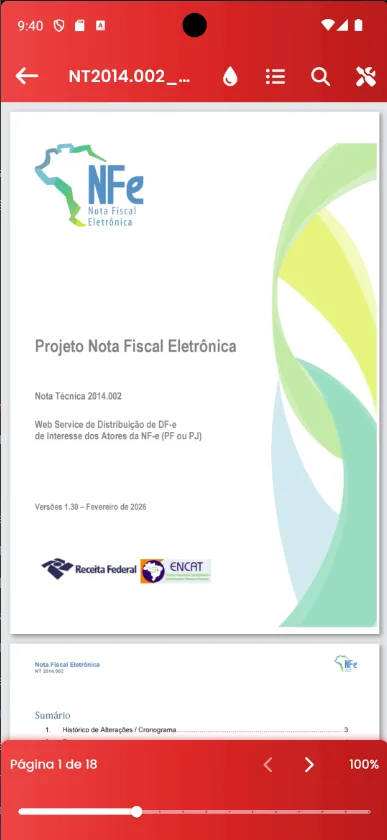
Tap a PDF in WhatsApp, email or Downloads, choose Open with Pdf Tools and you are in. The reader has word search, a thumbnail panel, zoom and a reading mode that reflows the text to fit your phone screen.
Password-protected PDFs open by asking for the password. And from the reader you can compress, sign, protect, split or share the file.
Get it on Google Play
Free for Android 7.0 or later
When to use it
- You open lots of PDFs from WhatsApp and email and want a lightweight reader.
- You are tired of ads between pages.
- You need to read PDFs on your phone without zooming all the time: use reading mode.
How to do it, step by step
- Install Pdf Tools from Google Play.
- Tap a PDF in any app and choose Open with Pdf Tools, or use Open PDF inside the app.
- Use search, thumbnails or reading mode.
- Open the tools menu to compress, sign or share.
Why do it with Pdf Tools
- No ads between pages
- Opens password-protected PDFs
- Reading mode for small screens
- Tools one tap away
Phone app vs. PDF website
| Pdf Tools (app) | PDF websites, in general | |
|---|---|---|
| File upload | No: everything happens on the device | The file is uploaded to the site's server |
| Internet | Not needed | Needed for the whole process |
| Ads | None | Varies from site to site |
| Sign-up | Not required | Some require it for extra features |
| Usage limits | No daily limit | Many limit use on the free plan |
Good to know
The reader does not edit the original text of a PDF. To write a new document, use Create Document and export it as PDF.
Frequently asked questions
How do I make Pdf Tools my default PDF reader?
Tap a PDF, choose Open with Pdf Tools and select Always, if your Android offers it.
What is reading mode?
It takes the PDF's text and reflows it to the width of the screen, so you do not have to zoom and scroll sideways.
Get Pdf Tools for free
No ads, no sign-up and no uploading your files to the internet.
Get it on Google Play